Samsung One UI 7 Update: New Features, Eligible Devices, and How to Get It
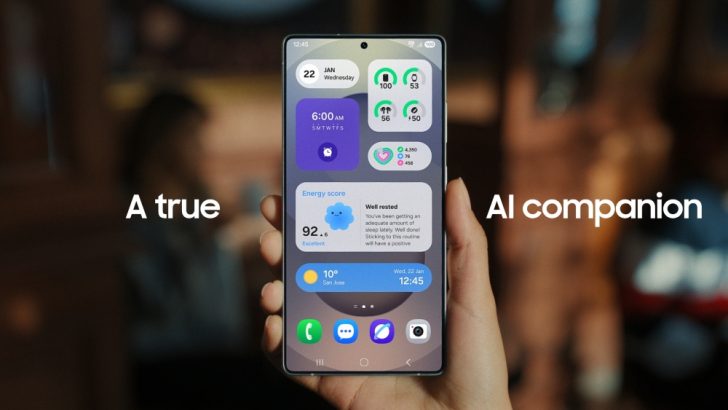
Image courtesy of Samsung
After months of anticipation, Samsung has finally started rolling out One UI 7, its latest software update based on Android 15. Packed with a sleek new design, smarter Galaxy AI features, and tons of exciting tools, this update promises to take your Galaxy experience to the next level. Whether you own a Galaxy S24 or a foldable, here’s everything you need to know about One UI 7!
When and Where Is One UI 7 Available?
Samsung kicked off the stable One UI 7 rollout in South Korea on April 7, 2025. By April 10, it began reaching users in Europe (Germany, Poland, UK), the US, and Canada. However, regions like India and others might have to wait a bit longer. Samsung plans to expand the rollout to more devices and countries by the end of April, but it’s a phased release—so not everyone will get it at once.
Pro Tip: Since the rollout is gradual, keep checking your device for updates over the next few weeks!
Which Devices Will Get One UI 7?
The first wave of One UI 7 updates is hitting these flagship devices:
- Galaxy S Series: Galaxy S24, S24+, S24 Ultra
- Galaxy Z Series: Galaxy Z Fold 6, Z Flip 6
- Others: Galaxy Z Fold Special Edition (select markets)
By late April, more devices will join the list, including:
- Galaxy S23, S23+, S23 Ultra, S23 FE
- Galaxy Z Fold 5, Z Flip 5
- Galaxy Tab S10, S10+, S10 Ultra, Tab S9 series
- Galaxy S24 FE
Over 46 Galaxy devices will eventually receive One UI 7. Mid-range and older models might see it by May or June 2025.
What’s New in One UI 7? Top Features to Explore
One UI 7 isn’t just an update—it’s a game-changer for Galaxy users. From a refreshed look to smarter AI tools, here’s what’s in store:
1. A Fresh, Modern Design
- New icons and smoother animations for a premium feel.
- Vertical App Drawer: Makes finding apps easier.
- Lock Screen Upgrades: Add widgets or customize your style.
- Revamped notification panel with separate toggles and alerts (fully customizable).
2. Smarter Galaxy AI Features
- Audio Eraser: Remove unwanted background noise from videos.
- Drawing Assist: Turn text prompts into sketches.
- Sketch to Image: Transform doodles into stunning photos.
- Portrait Studio: Get creative with photo edits.
- AI Select: Highlight screen elements to add events or edit images.
3. Cool New Tools
- Now Bar: Real-time updates (weather, notifications) on your lock screen.
- Battery Health Monitor: Check your battery’s condition and cycle count.
- Camera Boost: New zoom slider in Pro Video mode and AI-powered photo editing.
- Call transcription and summaries for recorded calls.
4. Enhanced Security & Privacy
- Android 15’s advanced app permission controls.
- Option to remove location data when sharing photos.
- Protection against risky app connections.
How to Download One UI 7
The One UI 7 update is around 5-5.5 GB, so use Wi-Fi to download it. Follow these steps:
- Go to Settings > Software Update > Download and Install.
- Tap Download if the update is available.
- Hit Install once downloaded.
- Back up your data and ensure enough storage before starting.
Heads-Up: If you use Microsoft SwiftKey, switch to Samsung Keyboard or Gboard before updating to avoid potential bugs.
What Are Users Saying?
Early adopters are calling One UI 7 one of Samsung’s best updates yet. The sleek design, buttery-smooth animations, and Galaxy AI tools are getting rave reviews. However, some users are frustrated by the delayed rollout. Have you got the update? Let us know your thoughts!
What’s Next? One UI 8 Rumors
While One UI 7 is still rolling out, whispers about One UI 8 are already circulating. Rumor has it that it could launch with Android 16 in July 2025, possibly pre-installed on the Galaxy Z Fold 7 and Z Flip 7. Stay tuned for more updates!
Tips to Make the Most of One UI 7
- Check for updates regularly on your Galaxy device.
- Back up your phone before installing the update.
- Explore new features like Now Bar and Galaxy AI to supercharge your daily tasks.
Got One UI 7 on your Galaxy device? Drop a comment below to share your experience, and don’t forget to follow us for more tech updates!